Refund Worksheet for Michigan Reconnect

Step-by-Step Guide for Completing a Refund Worksheet

Michigan Reconnect Scholarship/Michigan Reconnect Expansion Scholarship

This guide provides instructions for completing refund worksheets in the following situations:

  • Prior year refunds
  • Year-end balancing involving only negative amounts
  • Year-end balancing involving both positive and negative amounts
  • Prior Year Refund

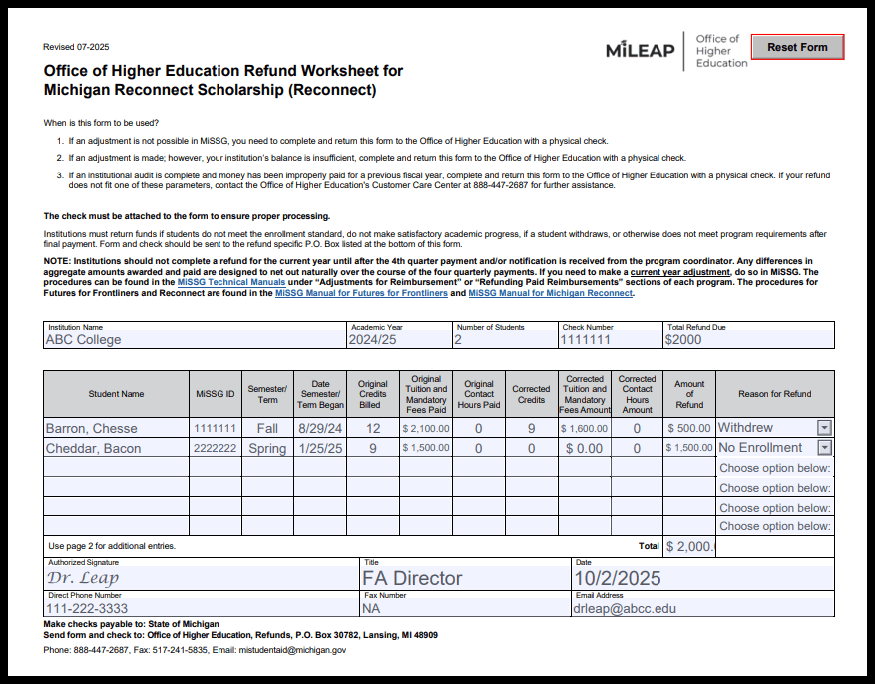
Prior Year Refund

Refund Worksheet for the Michigan Reconnect Scholarship with all required fields highlighted to show which sections must be completed.
  • Make check payable to State of Michigan.
  • Send checks to the CORRECT address. The address is: Office of Higher Education, Refunds, P.O. Box 30782, Lansing MI 48909.

Year End Balancing

How to complete a refund worksheet with negative dollar amounts:

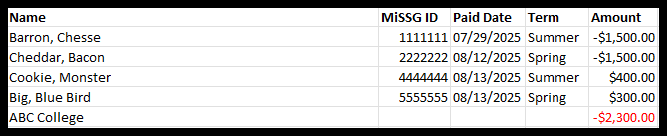
When completing the refund worksheet all the highlighted boxes MUST be completed. When the institution receives a year-end balance due email the following information is provided:

  • Student name
  • Student MiSSG Number
  • Semester the funds were decreased in
  • Amount of Refund Due

Refund Worksheet for the Michigan Reconnect Scholarship with all required fields highlighted to show which sections must be completed.

The following information can be obtained in MiSSG:

  • Original Credits Billed
  • Original Tuition and Mandatory Fees Paid
  • Original Contact Hours Paid

Refund Worksheet for the Michigan Reconnect Scholarship with all required fields highlighted to show which sections must be completed.

How to complete a refund worksheet with positive and negative dollar amounts:

With the year-end balance due email, the following information is provided:

  • Student name
  • Student MiSSG Number
  • Semester the funds were decreased in
  • Amount of Refund Due

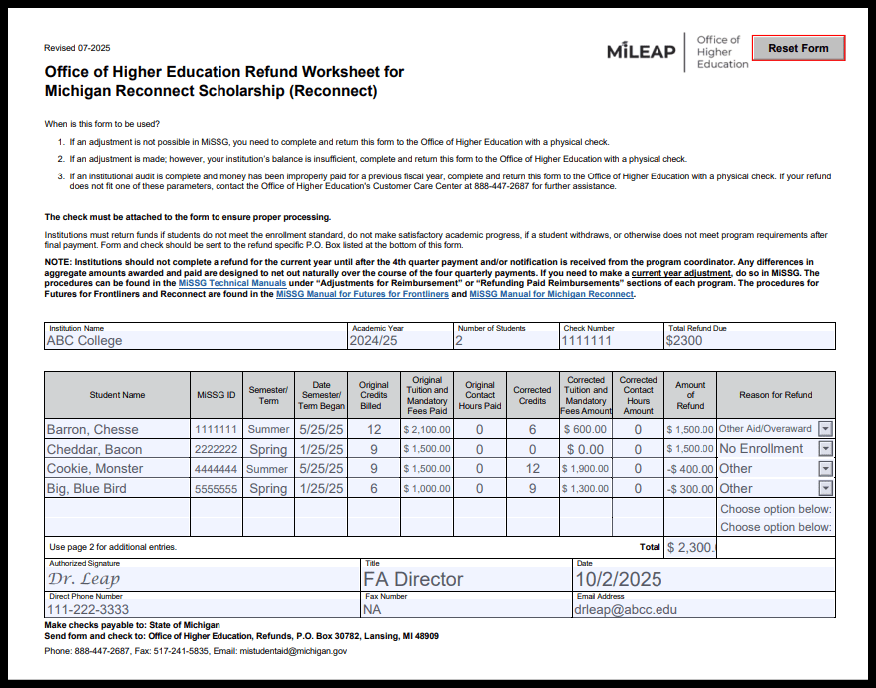
Refund Worksheet for the Michigan Reconnect Scholarship with an example of a completed refund worksheet

The following information can be obtained in MiSSG:

  • Original Credits Billed
  • Original Tuition and Mandatory Fees Paid
  • Original Contact Hours Paid

Refund Worksheet for the Michigan Reconnect Scholarship with all required fields highlighted to show which sections must be completed.

On the refund worksheet, the institution must enter all students listed along with their positive and negative dollar amounts. Enter increases as negative amounts and decreases as positive amounts on the worksheet. *Note that in your institution’s system, it may appear you are balanced; however, the state does not collect refunds until after Quarter 4 payments are processed. Therefore, you are not balanced in our system. If you are questioning the amount that the state is requesting, you can run “Payment Roster” report in MiSSG to see all the payments made to your institution.*