
Introduction
In a world where convenience meets technology, QR codes have become a new method of instant access. These pixelated squares may seem simple, but they unlock a universe of information at the tap of a smartphone camera. From streamlining payments to enhancing marketing strategies, QR codes are transforming the way we connect and interact with the digital realm. This Cyber Snapshot will explore the dynamic world of QR codes and discover how they’re reshaping our everyday experiences!
What is a QR Code? QR stands for “Quick Response”, and a QR code is essentially a two-dimensional barcode with the ability to store data, such as link to a malicious website.
Quishing, or QR phishing, is an up-and-coming cybersecurity threat in which the end goal is theft of sensitive information for the purpose of financial fraud, identity theft or ransomware. (1) Protecting against quishing attacks can be particularly difficult, since most individuals when they see a QR code will pull out a cellphone to scan the code, circumventing any cybersecurity measures you may have to protect against visiting malicious websites.
In 2021, quishing accounted for 0.8% of attacks. This has increased over the years settling at 10.8% as of January 2024 according to Egress.com. (2)
Different Types of Quishing
Emails or SMS: Bad actors can send emails or messages containing malicious QR codes claiming to be from reputable sources, such as banks, retailers, or service providers.
Physical Locations: QR codes can be placed in public places such as restaurants, cafes, or posters, enticing people to scan them for discounts, menus, or other services.
Social media: Malicious QR codes are shared on social media platforms or websites, often disguised as part of legitimate promotions or events.
How to Defend Against Quishing
The Michigan Cyber Command Center (MC3) recommends treating QR codes similar to phishing emails by taking the follwing measures to identify and protect yourself from quishing
Consider the source: If you receive a QR code from someone, ask yourself if you were expecting this email. Reach out to the sender to confirm they meant to send it. Remember, when reaching out do not use the contact acompanying the QR code.
Check the link: for any QR code you receive check the Unform Resource Locator (URL) by inspecting the top level domain to determeine if it is linking what is says. You can also utilize other tools such as Virus Total to help determine if the link is malicous.
Pay attention to the message: If the QR code is sent in an email or accompanied by a meassage, pay attention to the language in the email. Is there compelling language indicating urgency or a quick response is needed? Does the individual speak this way? Is the signature block accurate? Is the return address the same as the one it was received from?
Don’t scan public QR codes: Bad actors may place malious QR codes on parking meters to steal money or in restaurants to lead you to a malicous website.
Examples of Quishing
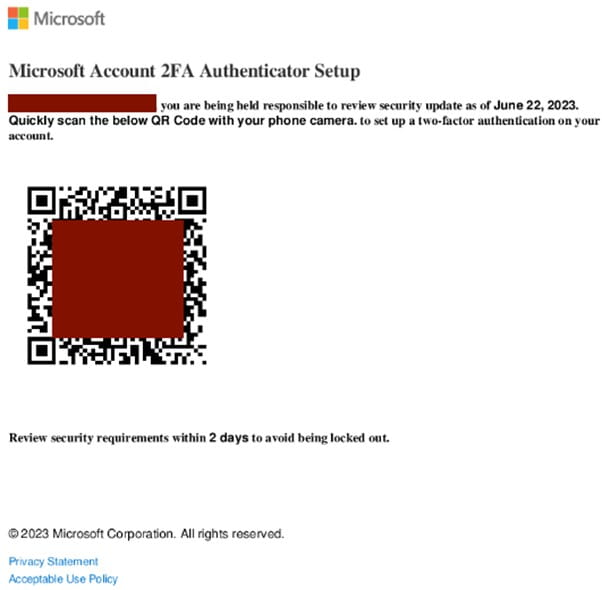
In 2023 a targeted quishing email was sent to an industrial energy company. This email contained a malicious QR code directing the recipient to a malicious website advising them their two-factor authentication (2FA) was going to expire. This email provided a QR code to scan to renew their 2FA. The goal of this quishing campaign is to trick users into giving the threat actor their credentials, compromising their security. (3)
Just this year, the San Francisco Municipal Transportation Agency alerted residence of malicious QR codes located at the Fisherman’s Wharf. These malicious QR codes mimicked the parking payment website requesting credit card information. (4)
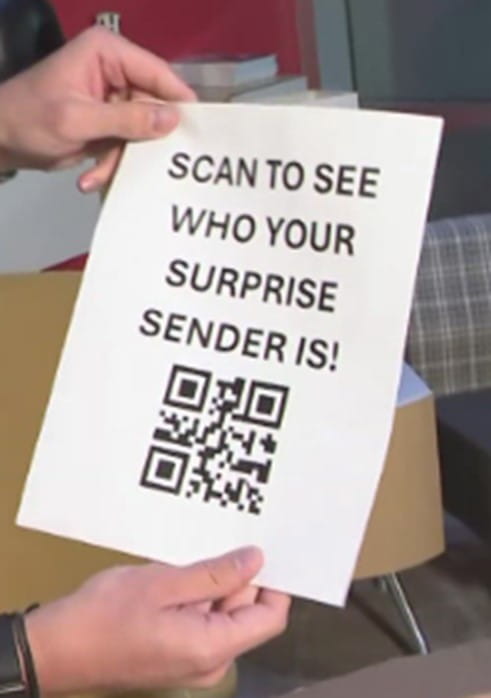
One of the latest scams involving QR Codes is known as a brushing scam. A brushing scam is when an individual receives a package in their name they did not order. The package does not have a return address; but contains a QR code inside that when scanned, allegedly shows you who sent it. The problem is when you scan the QR code it can expose your phone’s personal information, giving the bad actor access to the contents of your device. Another side to this same scam is the bad actor may be trying to create fictious positive reviews of the product to boost sales. (5)
Conclusion
Quishing is an up-and-coming method for bad actors to glean PII or steal credit card information. Any QR codes received online via email or social media should be treated the same as a link in an email message. If you receive one, especially if it was unexpected, reach out to the original sender using a known contact -- not the one provided in the body or signature block of the email -- to verify its validity. QR codes located in public should be treated with similar caution by verifying the URL and not entering any Personally Identifiable Information (PII) or credit card information.
References
(1) Cloudflare: What is quishing?
(2) Egress: The evolution of QR code phishing: Unmasking new quishing tactics
(3) Keepnet on LinkedIn: 5 Examples of Real-World QR Code Attacks
(4) SFGate: SFMTA uncovers elaborate scam at SF's Fisherman's Wharf
(5) Cincinnati Inquirer: 'Brushing' package scam comes to Ohio. Here's what to know, how to protect yourself
December 02, 2024
CS-07-2024