
Layers in MiEJScreen are the data and maps showing the MiEJScreen scores for every census tract in Michigan. The scores represented are:
- MiEJScreen Overall Score (sometimes called a “composite” score)
- 2 MiEJScreen Subscores:
- Environmental Conditions
- Population Characteristics
- 4 MiEJScreen Category scores:
- Environmental Conditions: Exposure
- Environmental Conditions: Environmental Effects
- Population Characteristics: Sensitive Populations
- Population Characteristics: Socioeconomic Factors
- Indicator scores for each of the 26 indicators.
Use the “About Data” button to see a data glossary for each of the 26 indicators. See the MiEJScreen Technical Report for the scoring matrix and additional information about the scores and MiEJScreen methodology.
Context Layers in MiEJScreen are data and maps that show additional information not incorporated into the MiEJScreen scores.
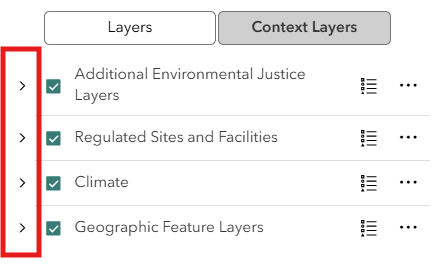
Context Layers can help users understand additional factors potentially related to Environmental Justice concerns in a community. These layers are organized into four groups:
- Additional Environmental Justice Layers
- Regulated sites and Facilities
- Climate
- Geographic Feature Layers
By default, the lists of Context Layers are collapsed when you load the app. To see the list of layers in one of the groups, click the arrow next to the layer group name.
Some context layers will only display at certain scales or zoom levels on the map. If a context layer is grayed out, try zooming in on the map.
