
All employees including retirees who return to work will have one or more DTL2 records for each pay cycle report. DTL2 records report all reportable compensation and the related member and/or employer contributions due based on reportable compensation. Below is an image of a blank DTL2 record.
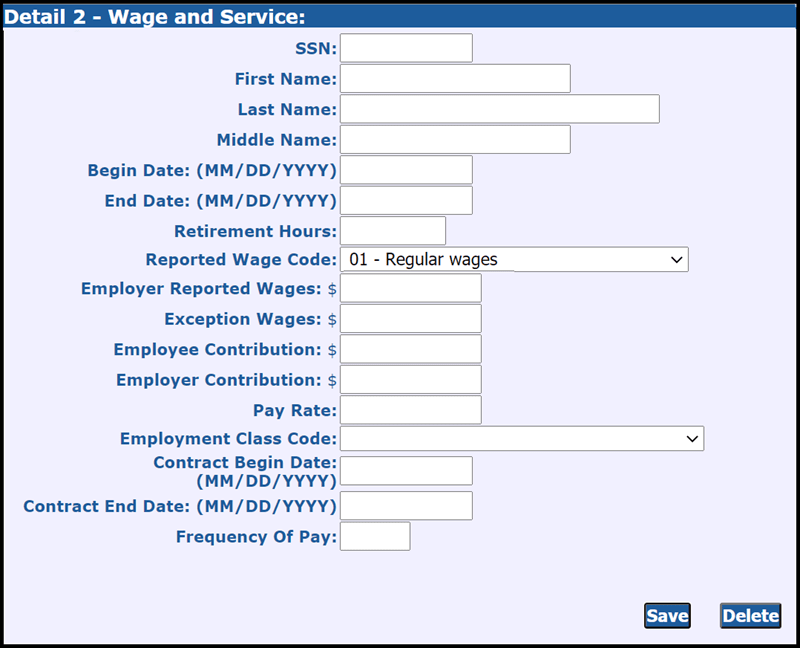
The following are the fields found in a DTL2 record:
- SSN (Ensure you have the correct SSN before reporting for any new employees)
- First Name
- Last Name
- Middle Name
- Begin Date. This date must match a begin date for a reporting period on your payroll calendar, unless the record is for coaches wages or weekly workers' compensation.
- End Date. This date must match an end date for a reporting period on your payroll calendar, unless the record is for coaches wages or weekly workers' compensation.
- Retirement Hours. Submit the actual number of hours worked for which your employees received wages working in the employment class code for this record. The hours must reasonably reflect the wages reported. See Chapter 5: Reporting Hours for Service Credit for specific information on different categories of employees (hourly, salaried, part-time, bus drivers, etc.)
- Reported Wage Code. See section 13.02.02: Detail 2 records - wage codes.
- Employer Reported Wages. Include reportable compensation only. See Chapter 4: Reporting Compensation.
- Exception Wages. For use only when reporting professional services leave or professional services release time with employment class code 9001. Employer Reported Wages and Exception Wages should match. See section 7.03.06: Reporting professional services leave/professional services released time on a DTL2 record.
- Employee Contribution. The dollar amount of the total DB contribution for the member, as determined by the DB Total rate on the contribution rate table. The amount must be formatted as 0.00. For members with the Premium Subsidy benefit, the DB total rate includes the DB rate plus a 3% contribution for the healthcare benefit.
- Employer Contribution. The dollar amount of the DB contribution for the member as determined by the rate on the current contribution rate table. The amount must be formatted as 0.00.
- Pay Rate. Enter the contract rate or hourly rate.
- Employment Class Code: Employment class codes define your employees' positions within your reporting unit. Include the appropriate class code for the wages being reported. See section 13.02.01: Detail 2 records - employment class codes and definitions. For employees who work in more than one position, submit a separate DTL2 record for each position. See section 7.03.01: Multiple DTL2 records for different employment class codes. For retirees, use the Working after retirement - employer guide to determine the correct class code.
- Contract Begin Date. For employees with a contract or a pay rate equal to or greater than $100, enter a begin date.
- Contract End Date. For employees with a contract enter the contract end date. For employees with or a pay rate equal to or greater than $100, the end date may be the pay period end date.
- Frequency of Pay. Enter any number from 1 to 26. For full-time employees who are paid every two weeks, enter 26; for employees paid once a month, enter 12. For temporary employees or those on only one pay period, enter the number of pay periods required.
For instructions on how to adjust wages and/or hours on a DTL2 record, see sections 7.05.07: Adjusting DTL2 records - overview and 7.05.08: Adjusting wages or hours on a DTL2 record.
Last updated: 03/18/2022