
The web Browser you are currently using is unsupported, and some features of this site may not work as intended. Please update to a modern browser such as Chrome, Firefox or Edge to experience all features Michigan.gov has to offer.
Accessing MiUI via MiLogin for Business
-
How will I get to MiUI?MiUI will be accessed through a MiLogin for Business account, similar to other State of Michigan services and systems. MiLogin is the State of Michigan's identity management solution that allows users to access many state services and systems online, across multiple departments, using a single user ID and password. This single sign-on for logging in as an employer under one ID and password simplifies the process for users. Understanding MiLogin is crucial as it will be the gateway to the new MiUI system, streamlining access and enhancing security.
-
Can I extend access to my MiLogin for Business account to multiple employees at my organization?MiLogin for Business does not allow sharing of accounts. Each account must be created individually by the user. This ensures that each account holder has their own unique identity and access to the services provided through MiLogin for Business.
If you have employees who need access to your information in MiUI, you can add them as users within MiUI. They will then be invited to activate their user accounts and will be able to access your business in MiUI using their personal MiLogin for Business account credentials. -
Do I need multiple MiLogin for Business accounts if I have and need to manage multiple businesses?No, you will not need multiple MiLogin for Business accounts. Employers can use the same MiLogin for Business to manage multiple business.
For each existing business the employer would like to add to their MiUI account, the employer will need to activate the business in MiUI using their FEIN, EAN, and Activation Code. For any new businesses the employer would like to add, the employer will need to register said business in MiUI. All those business will then be able to be managed under one MiLogin for Business account. -
Does Michigan Treasury Online (MTO) login work for MiLogin for Business?Yes, if you already have a MiLogin for Business ID created for MTO, please use that user ID and password to log into the MiLogin for Business portal, instead of creating a new account. We highly recommend that you test this access by logging in and confirming you have access to MiLogin for Business.
-
Is MiUI replacing the Michigan Treasury Online (MTO)?
No, MiUI is a separate service that you would add to your MiLogin for Business account. MiLogin for Business is the State of Michigan's identity management solution that allows users the ability to access state services and systems online, across multiple departments, using a single user ID and password.
Therefore, if you already have a MiLogin for Business ID created for any of these services, please use that user ID and password to log into the MiLogin for Business portal, instead of creating a new account.
-
Should Michigan Treasury Online (MTO) be added to MIUI or will they remain separate?MTO is a separate service. MiLogin for Business is a single sign on platform used for several different services including MTO and MiUI. You can use one MiLogin for Business account to access all your services. A step-by-step guide is available on MiUI University that explains how to add MiUI as a service.
-
How do Third-Party Administrators (TPAs) access MiUI?TPAs should use their MiLogin for Business account credentials to access MiUI. For more information on creating a MiLogin for Business account and accessing MiUI, review the step-by-step guide posted on MiUI University. When adding MiUI to your MiLogin for Business account, be sure to select the portal for third-party administrators, and not the portal for employers.
-
How many MiLogin for Business accounts can we create using the same email address?You are able to have 5 unique MiLogin for Business accounts under the same email address.
-
If I am a Third-Party Administrator (TPA) and a Michigan Employer, do I need to have separate MiUI accounts?Yes. If you are an employer and a TPA, you will need a separate MiUI account for each as the functionality for employers and TPAs is different. You will need an employer account to manage your business, and a TPA account to associate your TPA account with employers to complete any actions on their behalf. Please note that both the employer and TPA portal are available to add under one MiLogin For Business account. For more information on adding the portal to your MiLogin for Business account list of services, please refer to the MiLogin for MiUI step-by-step guide on MiUI University.
-
What do I do if I am an employer without a MiWAM account?We encourage all employers to sign up for a MiWAM account before Go-Live if they do not have one.
-
Why does MiLogin for Business not ask for my FEIN when setting up my account? How will MiLogin for Business know which business to associate with my account?MiLogin is a single sign-on platform for multiple State of Michigan services. Creating a MiLogin for Business account does not automatically link it to your business. You will need to activate your MiUI account in order for the two accounts to be linked.
-
Will there be CAPTCHA to login to MiUI?
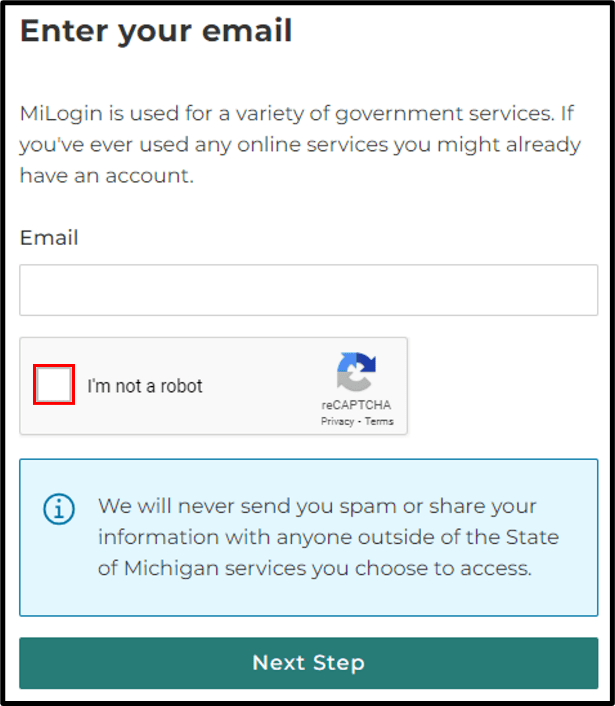
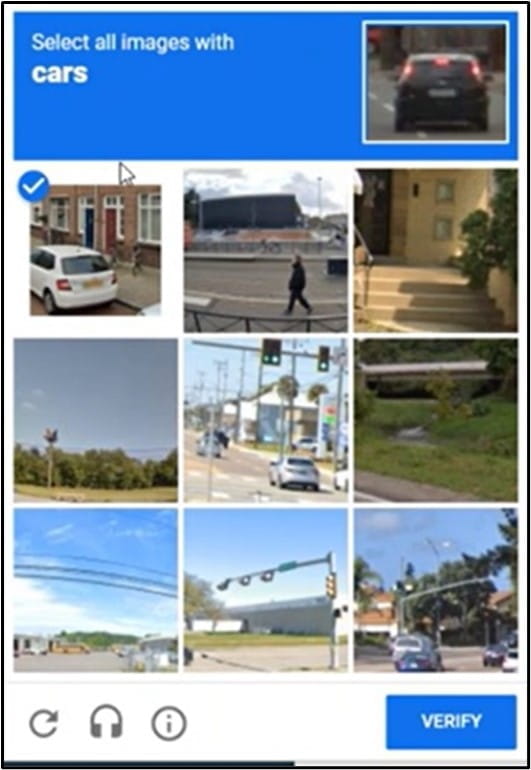
Yes, with MiUI all Employers and TPAs will create a MiLogin account, which is Michigan’s statewide access management system. As you create your user account, CAPTCHA will be presented for security purposes in the MiLogin system. This process allows the system to confirm you are not a robot. An example of this process is below.


Note: All future logins will not require you to complete the CAPTCHA process.
-
Will employers and Third-Party Administrators (TPAs) use the same usernames and passwords they do now for MiWAM?No, employers and TPAs must create a MiLogin for Business account that they will use to log into MiUI. There is a step-by-step guide on MiUI University that walks through this process. During the Two System Transition Period, users will have separate log ins that they will use for MiWAM and MiUI. These IDs and passwords do not sync.