The web Browser you are currently using is unsupported, and some features of this site may not work as intended. Please update to a modern browser such as Chrome, Firefox or Edge to experience all features Michigan.gov has to offer.
Quarterly Reports
-
Will UIA provide a sample acknowledge file?
Though UIA will not provide you a sample acknowledgement file, UIA is in the process of building a tool to help Employers and TPAs test file formats, which will be available prior to the launch of MiUI on MiUI University.
In November, UIA will launch a file format validator tool on MiUI University, that allows Employers and TPAs to test whether their quarterly wage reporting files meet MiUI’s file specifications.The tool will support validation for the four file formats accepted by MiUI:
- Delimited (i.e., CSV Comma Delimited)
- File extensions: .txt or .csv
- ICESA (NASWA Standard File Format)
- File extensions: .txt
- EFW2 (Formerly MMREF-SSA)
- File extensions: .txt
- XML (Standard XML Format)
- File extensions: .xml
For more information regarding these file formats please view MiUI University.
- Delimited (i.e., CSV Comma Delimited)
-
Will there be any changes to the penalty notices and how they are generated and sent to clients?No, the same penalty notices will be generated and sent to employers in MiUI as they are currently generated in MiWAM. In addition, Bi-Annual Statements of Account will be added with the launch of MiUI. These statements will be generated and sent to employers with any amounts due on June 30 and December 31 of each year.
-
Will 2025 fourth quarter reporting have to be done in MiUI or MiWAM?2025 4th Quarter reporting will be submitted in MiWAM. Reports must be submitted by January 26, 2026.
-
Why are larger files going into overnight processing?To maintain system performance and account for the volume of reports being filed at the same time, larger files are processed during off-hours.
-
When will UIA provide a navigation document for uploading e-files or downloading data exchange files from the agency website?
After MiUI launches, employers and TPAs will file Wage and Tax Reports in MiUI using their MiUI accounts, and all e-files and data exchange files will be handled within MiUI.
Please see the Quarterly Wage Report Quick Reference Guide on MiUI University for more information.
Please note that, ACH Credit will continue to be available through the e-lockbox, and ACH Debit will continue to be available through CEPAS.
-
Since there is a change in e-file specifications, will there also be a form change?
There are four new file formats that will be accepted in MiUI. Detailed information was previously shared in June 2025 and through MiUI University. Employers may need to update existing processes to reflect acceptable file formats. There is no paper form included with e-filing.
Per MCL 4141.4 (2015): All employers shall file quarterly by an electronic method approved by the unemployment agency. An employer that complies with the reporting requirements of this subsection by filing electronically a quarterly wage report using a method approved by the unemployment agency is not required to file periodically to disclose contributions under this act.
- Delimited (i.e., CSV Comma Delimited)
- File extensions: .txt or .csv
- ICESA (NASWA Standard File Format)
- File extensions: .txt
- EFW2 (Formerly MMREF-SSA)
- File extensions: .txt
- XML (Standard XML Format)
- File extensions: .xml
There are also new filing methods available within MiUI.
- File Upload: Upload an electronic wage file using one of the four above file formats.
- Copy Previous Quarter: You can use or copy/modify a report from a previous quarter data.
- Manual Entry: Manually enter individual wage records in MiUI.
- Delimited (i.e., CSV Comma Delimited)
-
How do we plan our filings that go into overnight processing?
When trying to upload larger files, MiUI will display a message saying, "The uploaded file is larger than the online file upload limit and shall be processed through the overnight batch process. Please check View Submission History the next Business day for results."

For file(s) processed overnight, you will be able to view a confirmation number by 8:00 A.M. EST the next business day on the View Submission History screen, in the Confirmation column.
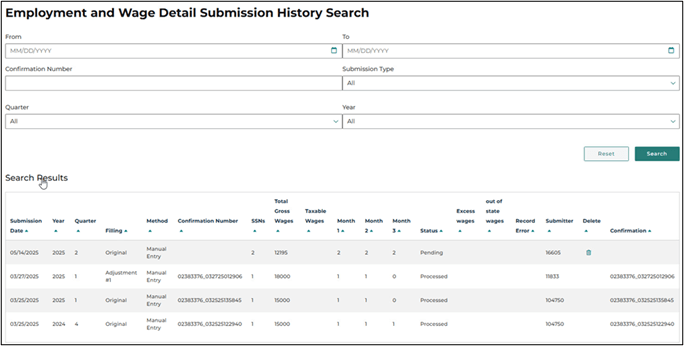
If the confirmation number is selected, the confirmation file will be automatically downloaded to your computer.
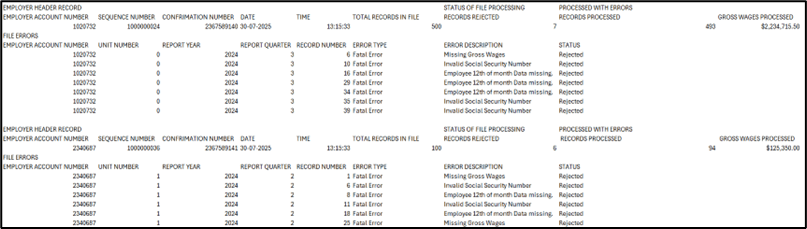
The confirmation file will show results at both the record level and file level and display the number of successfully processed employers. If the file is unable to be processed due to errors, results will only be displayed at the record level. For a TPA who submitted on behalf of multiple Employers, the file will include a breakdown of errors by Employer.

-
How can an employer assign a Third-Party Administrator (TPA) in MiUI?This documentation will be available on MiUI University later this month.
-
What files will go into overnight processing?
Any file greater than 1,000 records and/or has 5 or more employers will be directed to overnight processing.
For example:
- A file that has 2,000 records and 3 employers will be processed overnight.
- A file that has 900 records and 8 employers will be processed overnight.
-
Currently, we see a file size limitation for e-files of 5MB. What file sizes will be accepted?The file size will be increased from 5MB.
-
As a Third-Party Administrator (TPA) am I able to manually enter my wage reports in MiUI?TPAs can manually enter individual wage records for a specific employer by navigating to the employer in MiUI and submitting a wage report on their behalf.
TPAs will not be able to manually enter individual wage records when using the TPA view in MiUI. They will only have the option to submit via a file upload, or to report that there were no employment and no wages paid in the quarter. -
Can I upload a wage file with just one client?Yes, a single client file can be uploaded in MiUI.
-
Can you submit quarterly wage reports manually instead of submitting via a file upload?Yes, MiUI offers four filing methods that can be used to submit quarterly wage reports from the employer account: manual entry, file upload, copying from a previous quarter, or reporting that there were no employment and no wages paid in the quarter.
-
How do you complete quarterly wage reporting for tax periods with zero wages?There is a separate bulk report option for zero wages in a given quarter. Please refer back to MiUI University for an update as we get closer to go-live.
-
How many wage files can be uploaded in one day?There is no limit on the amount of files uploaded.
-
Why are the new file formats missing family status indicators?This is no longer required by the State of Michigan.
Effective June 28, 2012, the benefit limitation (7 weeks) for family members employed by family-owned corporations was removed. The entitlement is the same for all claimants. MiWAM included this field, but MiUI will not. -
Will an originator be identified in the wage file submission?In the Wage Submission History section of MiUI, there will be a column labeled "Submitter" which displays the name of the person who submitted the wage report. It will use the name of the person who was logged into MiUI when the report was submitted.
-
Will employers be able to test wage files in MiUI before the required submission date?
You can test your wage report files via the Wage Report File Validation Tool. This tool will allow you to upload a wage report in your preferred file format and will inform you of any identified issues associated with your submission. If your file is formatted correctly, you will receive a message indicating that you have submitted a valid file.
Users should not upload real employer or employee information to this tool, as internet communication may not be secure.
-
Will errors be displayed immediately after a wage file is submitted?If the wage file has less than 1,000 records and/or has 5 or less employers it is processed in real time, displaying any errors immediately at the record level. The first 100 error records related to a submissions will be displayed, with up to ten errors displayed per page. If the wage file has more than 1,000 records and/or has 5 or more employers it is processed as part of an overnight batch, and the errors will be displayed at both the record level and file level in the confirmation file available the next day at 8:00 AM ET.
Please review the File Format Instructions on MiUI University for more information, and test your wage reports via the Wage Report File Validation Tool available in MiUI University. -
Will wage file errors be displayed at the record level?Yes, smaller wage files will display their errors at the record level and larger wage files will display their errors at the record and file level.