The Michigan Unemployment Insurance Agency (UIA) is transitioning to a new tax and benefits system called MiUI, which will replace the current Michigan Web Account Manager (MiWAM). MiUI is being launched in two parts, with Tax functions launching on Monday, Feb. 23, 2026, and Benefits functions scheduled to launch in summer 2026.
In this issue of the MiUI Minute, we’re providing information on MiUI account initiation and registration, as well as what to do after MiUI launches. Find all past editions of the MiUI Minute at MiUI University.
MiUI Account Initiation and Registration
With just a few days left until MiUI with Tax functionality launches, confirm you are ready for Go Live with this Countdown to MiUI checklist of the Top 5 Must Do Items:
Countdown to MiUI - Must Do Items
Before Go Live, be sure to log into your MiLogin for Business account and add MiUI as a service. If you do not have a MiLogin for Business account, please create one. For help with any part of this process, reference this guide:
Create a MiLogin for Business Account and Add MiUI
For MiLogin general questions, visit the MiLogin Help Page.
Additionally, employers and third-party administrators (TPAs) will need a few pieces of information to activate their MiUI account after the new computer system launches on Monday, Feb. 23:
Employers will need:
TPAs will need:
- FEIN or Social Security Number (SSN).
- MiUI Activation Code found in MiWAM.
Employers and TPAs must log into MiWAM to access the 8-digit MiUI Activation Code. Users with Master or Limited access security roles will be able to see the MiUI Activation Code tab on the MiWAM landing page (pictured below).
Note: If you are a TPA who is also a Michigan employer, you will need to log in using your Master access security to see both Activation Codes on your homepage.
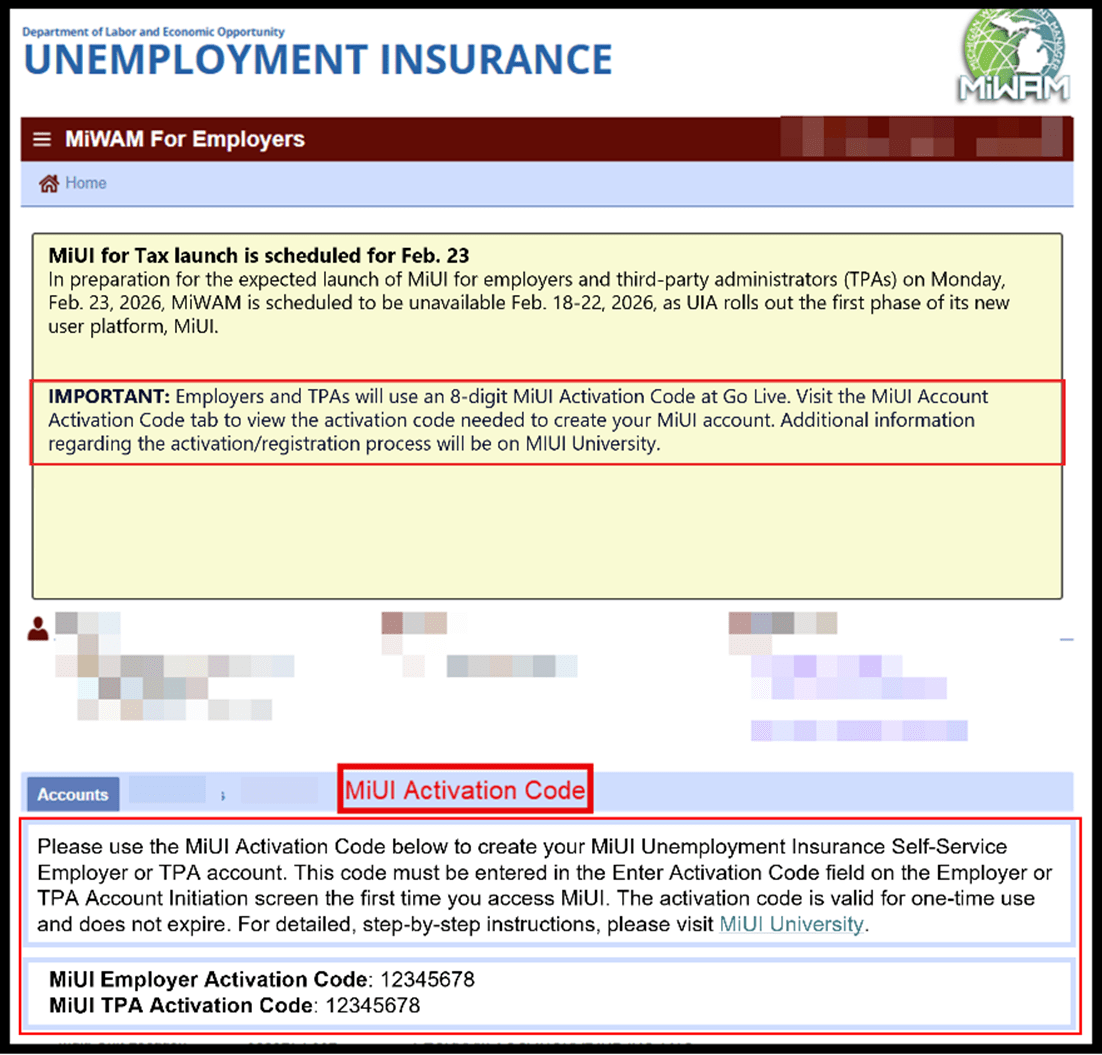
For more detailed information on the account initiation process, and what to expect after Go Live, check out this video.
You can also refer to these job aids to learn more about account initiation:
Employer/TPA Registration
If a MiWAM account did not come over to MiUI, please register as an employer or TPA.
To register as an employer, login to MiLogin for Business and select Register Employer. Employer registration is an eight-step process, and you’ll need the following information to begin:
- Your Federal Employer Identification Number (FEIN).
- The state and date of incorporation for corporations.
- The owner, corporate officer, partner or member’s date of birth and Social Security Number (SSN).
- The Individual Taxpayer Identification Number (ITIN) assigned by the Internal Revenue Service (IRS) for an entity owned by a foreign individual.
- If acquiring an existing Michigan business, the unemployment employer account number and FEIN of the business being acquired.
- An electronic copy of a Purchase Agreement; Bill of Sale; or 501(c)(3) IRS Determination for tax - exempt status (Bill of Sale and 501(c)(3) can be mailed within 30 days of registration).
To register as a TPA, login to MiLogin for Business and select Register Third-Party Administrator (TPA). TPAs have fewer steps and required information to register. For more information on employer/TPA registration, the MiUI Toolkit has detailed step-by-step information to walk you through the process.
What to Do After Go Live
After MiUI Go Live on Feb. 23, here are your next steps:
- Initiate your MiUI account.
- Employers will use their Employer Account Number (EAN), FEIN, and the MiUI Activation Code from MiWAM. TPAs will use the FEIN or SSN, and the MiUI Activation Code from MiWAM.
- Review account details in MiUI.
- Confirm that information transferred from MiWAM to MiUI is correct, including TPA role assignments.
- Get ready to submit wage reports and payments in MiUI.
- Go to MiUI University with questions and to learn more!
- MiUI University should be your go-to, bookmarked site for information and resources about MiUI. The site is already stocked with 84 categorized and searchable FAQs, 16 resource guides, seven tutorials and demo videos in a Training library, and more is being added to the site to provide the most up-to-date resources for employers and TPAs. For more help, see the additional support channels below.
Where to Find More Information
Thank you for your continued support as we transition to MiUI. We look forward to collaborating with you throughout the launch to make this transition a success.
Employers and TPAs can can find more information and resources about UIA’s new computer system implementation at
MiUI University. For a quick guide on the most important things you need to do to prepare for Go Live, refer to the
Countdown to MiUI—Must-Do Items.
UIA continues to offer employer and TPA seminars weekly.
These sessions provide an overview of key system changes, live demonstrations, guidance to help their organizations prepare for the transition, and opportunities to ask questions. If you would like to attend a seminar please sign up here to select a seminar time.
If you need assistance:
We're here to help every step of the way!
Michigan Unemployment Insurance Agency