The Michigan Unemployment Insurance Agency (UIA) is transitioning to a new tax and benefits system called MiUI, which will replace the current Michigan Web Account Manager (MiWAM). MiUI is being launched in two parts, with Tax functionality being released today, February 23, and Benefits functionality scheduled to be available this summer.
In this issue of the MiUI Minute, we’re providing information on today's launch of MiUI for Tax. Find all past editions of the MiUI Minute at MiUI University.
MiUI for Tax is Live!
We’re excited to announce that MiUI for Tax is officially live as of today. This transition is a significant step forward in delivering fast, fair, and fraud-free service to Michigan’s residents and businesses.
Benefits functions will transition to MiUI this summer. Until that second phase launches, your benefits work will continue in MiWAM. For guidance on what to use during the two-system transition period after Go Live for Tax, refer to the Two System Transition Period Quick Reference Guide.
Tax functions such as filing quarterly wage reports, uploading wage files, registering as a new business, and more are now available in MiUI. All users must have a MiLogin for Business account to use the system.
To get started, initiate your MiUI account:
- Employers and TPAs should log into their MiWAM account to locate their 8-digit MiUI Activation Code. This code is located on the MiUI Activation Code tab. This will be used to access your MiUI account. For more details on accessing your Activation Code, refer to last week’s MiUI Minute on the topic.
- Navigate to the UIA homepage to access MiUI (see screenshot below):
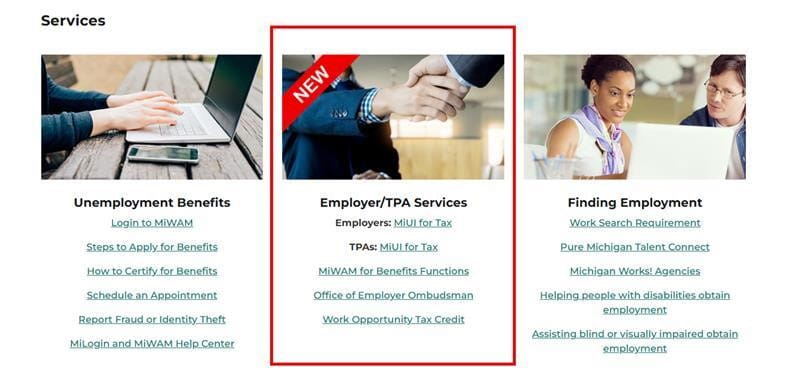
- Log in or create your MiLogin for Business account.
- Initiate your MiUI account using your MiUI Activation code and providing the necessary credentials:
Employers will need:
- Employer Account Number (EAN). (Linked to MiUI Minute on the topic for reference)
- Federal Employer Identification Number (FEIN).
- MiUI Activation Code found in their MiWAM accounts. Note: this must be typed in when initiating the account.
TPAs will need:
- FEIN or Social Security Number (SSN).
- MiUI Activation Code found in MiWAM. Note: this must be typed in when initiating the account.
For detailed instructions refer to the following Initiate Existing Account job aids:
Once you have initiated your MiUI account:
- Review your account details, including account information and TPA associations / roles.
- Add additional users to your account, as needed.
- Refer to the following checklist for a quick guide on the most important things you need to do to get started with MiUI:
Getting Started with MiUI for Employers and TPAs
Let MiUI Navigator be Your Guide
Navigator is a tool within MiUI that delivers on-screen, step-by-step “tours” to help you complete specific processes in the system. Each tour displays pop-up instructions with helpful text to guide you through each step. Please watch the video below to learn more and check out MiUI University for more MiUI Navigator Resources.
Watch the Navigator Video
Where to find ongoing support and learning resources
Thank you for your continued support as we transition to the new MiUI system. We look forward to collaborating with you beyond the launch to make this transition a success.
Employers and TPAs can can find more information and resources about UIA’s new computer system implementation at
MiUI University.
If you need assistance:
We're here to help every step of the way!
Michigan Unemployment Insurance Agency


.png?h=403&w=1727&rev=2d7ad75450174b4f8836096d3d840852&hash=D8B5216AA3626E5CA73C41D84848394A)


.png?rev=f8667e36bb7649b78b91a4db3ceb70b4&mw=1440&hash=21CACD164C8BA89E9ACCEF75761E2B86&extension=webp)
