The Michigan Unemployment Insurance Agency (UIA) is transitioning to a new tax and benefits system called MiUI, which will replace the current Michigan Web Account Manager (MiWAM). MiUI is being launched in two parts, with Tax functionality being released today, February 23, and Benefits functionality scheduled to be available this summer.
In this issue of the MiUI Minute, we’re providing information on today's launch of MiUI for Tax. Find all past editions of the MiUI Minute at MiUI University.
What’s Next After MiUI Go Live
MiUI for Tax went live on Monday, February 23. Employers and Third-Party Administrators (TPAs) can now perform tax functions such as filing quarterly wage reports, uploading wage files, registering as a new business, and more in MiUI.
Note on the February 23 MiLogin Outage
Due to a global IBM outage, there was a statewide issue on Monday with MiLogin, the State of Michigan’s gateway to access services using a single user ID. MiLogin is maintained by the Department of Technology, Management, and Budget (DTMB) and not UIA. The outage was unrelated to the launch of the new MiUI system or restoring MiWAM services, but it may have caused access issues for some users. The global outage was resolved late Monday and DTMB was able to restore the MiLogin system for all state agencies that were affected. We appreciate your patience as IBM worked to resolve the issue and MiLogin came back online.
Post-Go Live FAQs
Now that MiUI for Tax is live, check out these FAQs to find answers to common questions:
Where do I begin with MiUI?
Please follow the steps in the Getting Started with MiUI reference guide.
When I reach the Account Setup page, which option should I select to set up my MiUI account?
If you previously used a MiWAM account for tax functions, please select either the Employer Account Initiation or the TPA Account Initiation option when setting up your account. Register Employer is for new employers that did not previously have a MiWAM account. Activate User Profile is for new users when an account administrator has added them to MiUI.
I don’t see the MiUI Activation Code in MiWAM. Where can I find it?
Employers and third-party administrators (TPAs) must log into MiWAM to access the 8-digit MiUI Activation Code. Users with the MiWAM Master security role will be able to see the MiUI Activation Code tab on the MiWAM landing page (pictured below).
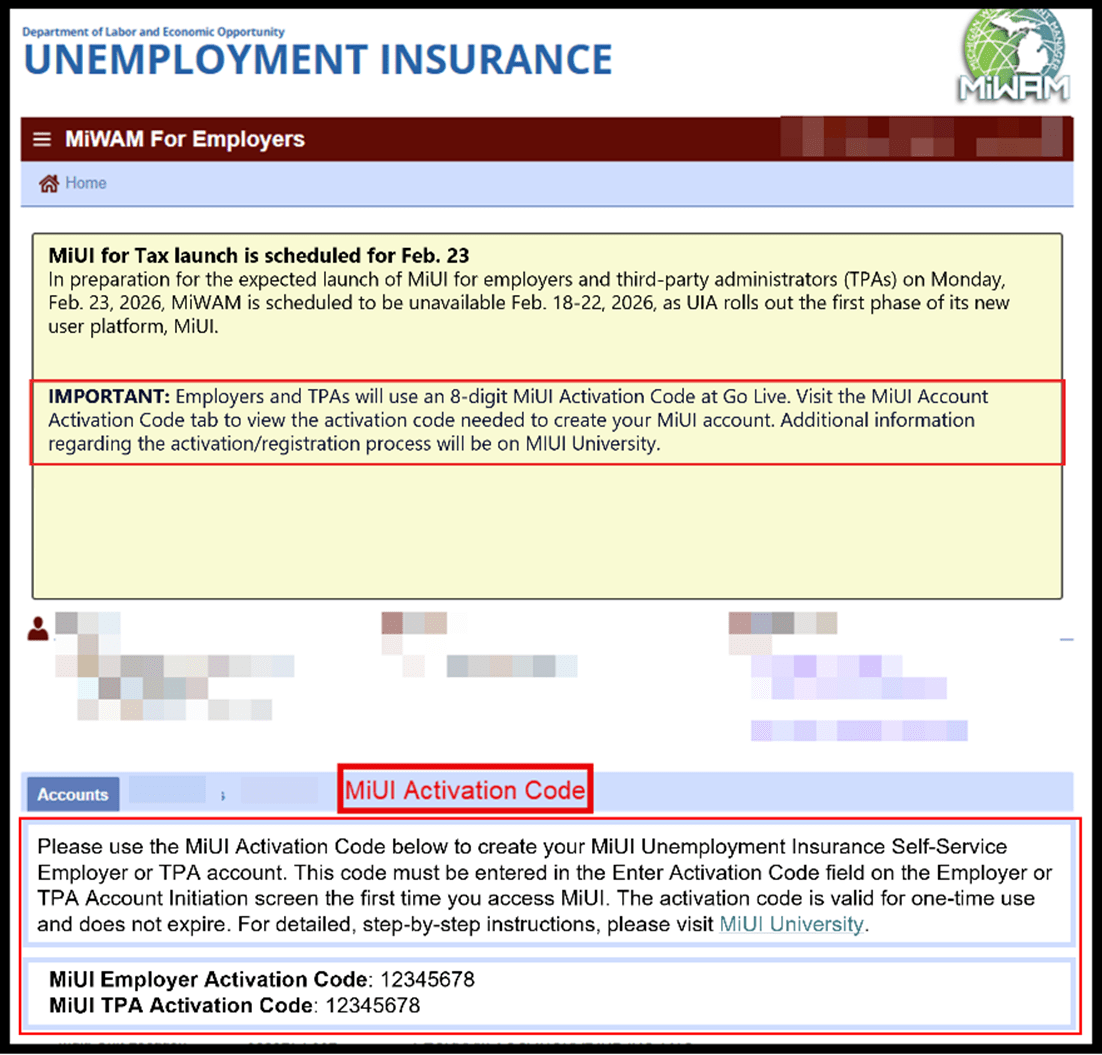
If you do not see your MiUI Activation Code tab, you may not have access. You can provide your employer account number, username, and title to MiWAMSupport@Michigan.gov to get access to your MiUI Activation Code tab.
If I am a TPA and an employer, do I need multiple MiLogin for Business accounts?
Yes, two MiLogin for Business accounts are needed. If you are a TPA and an employer, you must have a separate MiUI account for each as the functionality for employers and TPAs is different. You will need an employer User ID and password to manage your business, and a separate TPA User ID and password to associate your TPA account with employers to complete any actions on their behalf.
How do I find my TPA’s ID?
Please use this TPA ID reference list to locate your TPA and their associated ID. This ID is used as part of the association process when adding a TPA in MiUI. There are several reference guides and the MiUI Toolkit available on MiUI University.
Where to find ongoing support and learning resources
Thank you for your continued support as we transition to the new MiUI system. We look forward to collaborating with you beyond the launch to make this transition a success.
Employers and TPAs can can find more information and resources about UIA’s new computer system implementation at
MiUI University.
If you need assistance:
We're here to help every step of the way!
Michigan Unemployment Insurance Agency


.png?h=403&w=1727&rev=2d7ad75450174b4f8836096d3d840852&hash=D8B5216AA3626E5CA73C41D84848394A)


.png?rev=f8667e36bb7649b78b91a4db3ceb70b4&mw=1440&hash=21CACD164C8BA89E9ACCEF75761E2B86&extension=webp)
