The Michigan Unemployment Insurance Agency (UIA) is transitioning to a new tax and benefits system called MiUI, which will replace the current Michigan Web Account Manager (MiWAM). MiUI is being launched in two parts, with Tax functions now live, and Benefits functions scheduled to be available this summer.
This issue of the MiUI Minute is the third in a series of articles about Quarterly Wage Reporting in MiUI. In this issue, we’re providing tips and tricks for wage reporting.
10 Tips and Tricks for Filing Your Quarterly Wage Report
All past due and future Quarterly Wage Reports must be submitted in MiUI. First Quarter 2026 wage reports are due Monday, April 27.
As Michigan employers and third-party administrators (TPAs) adjust to the new MiUI system, we want you to know we have developed many resources to guide you along the way. We want you to be able to submit your wage reports confidently and avoid last minute surprises!
These 10 tips focus on the practical steps that make the biggest difference—how to get prepared before you begin your wage report, what to double-check as you enter or upload wage files, and how to find answers to questions you may have along the way.
- Initiate your MiUI Account!
- If you have not already done so, you must initiate your MiUI account. You have to create or use your existing MiLogin for Business account to access MiUI. You can find a link on UIA’s website to access and initiate your MiUI account. For opportunities to ask questions, you can attend an Employer / TPA seminar for account activation happening daily at 10 A.M. for the next few weeks.
- Attend an Employer / TPA Seminar for Wage Reporting
- Prior to the next Quarterly Wage Report deadline of April 27, UIA is providing employers and TPAs weekly seminars for wage reporting. These online sessions are a great benefit to those who want to learn more and ask questions about how to submit wage reports in MiUI to be able to meet the upcoming deadline.
- If you would like to attend an employer / TPA seminar, sign up for a session online.
- The next seminar for employers and TPAs is scheduled for Wednesday, April 15.
- Each session will provide an overview of key wage reporting functions in MiUI, live demonstrations, and opportunities to ask questions.
- Know Your Options for Filing Methods
- There are four methods for filing Quarterly Wage Reports in MiUI:
- File upload (mentioned in Tip #5 below): Best for an employer with a large number of employees, this method enables you to efficiently upload employee information and wage amounts.
- Manual Entry: Ideal for employers with 10 or fewer employees (but can be used by any employer), this method allows you to easily enter individual employee information and wages.
- Copy and Modify Previous Quarter: A convenient method to use if you have an existing wage report that was successfully submitted and minimal changes to the number of employees or wage amounts have occurred from a previous quarter.
- No Employment and No Wage Report: If an employer had no employees and therefore no wages for the quarter, they are still required to submit this information. Otherwise it will identify the quarter as missing a wage report and could incur penalties.
- Note: The Manual Entry and Copy and Modify Previous Quarter filing methods are only available at the employer level, not for TPAs. Read MiUI Minute Issue #27 to learn more about the different filing methods.
- Use Navigator for Help Completing your Wage Report
- MiUI Navigator provides online assistance with completing Quarterly Wage Reports. Navigator is a tool within MiUI that delivers on-screen, step-by-step “tours” to help you complete specific processes in the system. Each tour displays pop-up instructions with helpful text to guide you through each step. The Submit a Wage Report Navigator tour guides employers and TPAs through submitting a wage report via file upload. Refer to this Quick Reference Guide for more information about using Navigator.
- Choose the Right File Format
- When using the file upload method to file Quarterly Wage Reports , only the following four file formats are accepted: MiUI Delimited, ICESA, EFW2, or XML. The MiWAM file format (Form 1028) will no longer be accepted, and employers and TPAs will need to update existing processes to reflect acceptable file formats. Please make sure you are submitting the correct file format. If you are not, the file will be rejected. Check if you have the correct file format using the file format validator which will indicate if your file format is valid. Read MiUI Minute Issue #26 to learn more about uploading files and the four MiUI formats.
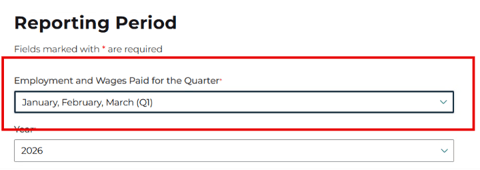
- Select January, February, March (Q1) for the Reporting Period
Be sure to choose the correct Reporting Period from the drop down.
- Understand How File Processing Works
- Small files (containing 1,000 or fewer records and, if a TPA submission, includes fewer than five employers) will be processed immediately.
If you submit a large file (containing either more than 1,000 records or represents five or more employers), that requires an overnight batch. You will see the status of the file in the Wage Submission History Search screen.
- Statuses include:
- Unprocessed – Batch has not processed the file.
- Loaded Files with No Errors – File was processed with no errors.
- Loaded Files with Errors – File was processed with errors.
- You can submit a wage report for an employer with errors (fatal and non-fatal) if there are fewer than 100 total and less than 25 percent of employee records have an error. Please note: After 14 days, if the errors have not been corrected, the records will be included in the wage report. However, the employer will be assessed a wage filing penalty for incomplete records.
- Rejected – File was not able to be processed, whole file was rejected.
- Confirm Your Values are Correct
- The MiUI Delimited format requires that gross wage fields (i.e. unemployment insurance gross wages) include cents in the field value.
- Examples include:
- $10,000.00 in wages = 1000000
- $10,000.50 in wages = 1000050
- $10,000.99 in wages = 1000099
2. The acceptable values for the Quarter in MiUI are:
- For Quarter 1 use 03.
- For Quarter 2 use 06.
- For Quarter 3 use 09.
- For Quarter 4 use 12.
- Leverage Learning Resources Available to You
- There are a multitude of resources available to you on MiUI University to be fully prepared to submit your Quarterly Wage Reports in MiUI by April 27. Don’t miss the Quarterly Reports in MiUI page, where you can find guides that walk you through the file format requirements and Quarterly Wage Report submission process. Additionally, there are several wage report submission job aids, a Quarterly Reports YouTube playlist, and FAQs.
- Unbox the Full MiUI Toolkit
- To further understand MiUI and explore its features in-depth, review the MiUI Toolkit on MiUI University. The toolkit includes step-by-step instructions for file upload, manual entry, and no employment and no wage report.
Where to find ongoing support and learning resources
Thank you for your continued support as we transition to the new MiUI system. We look forward to collaborating with you beyond the launch to make this transition a success.
Employers and TPAs can can find more information and resources about UIA’s new computer system implementation at
MiUI University.
You can find a link on
UIA’s website to initiate your MiUI account. Be sure to bookmark the link applicable to you:
If you need assistance:
We're here to help every step of the way!
Michigan Unemployment Insurance Agency




.png?rev=f8667e36bb7649b78b91a4db3ceb70b4&mw=1440&hash=21CACD164C8BA89E9ACCEF75761E2B86&extension=webp)
