The Michigan Unemployment Insurance Agency (UIA) is transitioning to a new tax and benefits system called MiUI, which will replace the current Michigan Web Account Manager (MiWAM). MiUI is being launched in two parts, with Tax functions now live, and Benefits functions scheduled to be available this summer.
In this issue of the MiUI Minute, we’re providing information for employers about payments in MiUI. The next issue will feature payments information specific to third-party administrators (TPAs). Find past editions of the MiUI Minute at MiUI University.
Employer Payments in MiUI
Payments Overview
Tax payments can be made using the Payment Information drop-down in MiUI’s left navigation. One way to submit payments is by checking the Outstanding Balance screen which displays balance amount details to be paid by quarter and allows users to make payments. For additional detail on payments, review the Payments in MiUI Quick Reference Guide.
Payment Methods
Payment methods include:
Employers can schedule payments as well as make quarterly, voluntary contribution, reserve balance, or loose payments. In addition to submitting payments, employers can view, search, and reconcile payments.
Payment Profile
Payment profiles must be created in MiUI; this information was not transferred in the transition from MiWAM (payment source). TPAs can make an individual payment if they have been assigned the Edit Tax Payments Update and Submit role for an employer’s account and their payment profile has been established.
Additional Resources
For more information, visit the Payments page on MiUI University. You can find guides that will walk through the methods of making payments, step-by-step resources for making bulk payments, and FAQs.
The MiUI Toolkit is an invaluable resource for payments information.
There is also a Payments YouTube playlist featuring useful videos for employers. The following videos provide a helpful overview of payments:
Bonus Wage Report Tips!
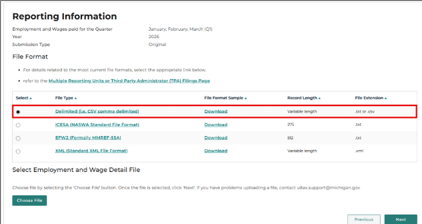
Select the correct file type: When using the file upload filing method, please select the correct file type before uploading your quarterly wage report file.
Example: Submitting a Delimited file.
Enter only alphanumeric values for employee Social Security Numbers (SSN): When entering employee SSN records do not include hyphens, commas, dashes or decimals.
Example = 123456789
Please reference any of the past issues of the MiUI Minute for more information about submitting quarterly wage reports in MiUI.
Where to find ongoing support and learning resources
Thank you for your continued support as we transition to the new MiUI system. We look forward to collaborating with you beyond the launch to make this transition a success.
Employers and TPAs can can find more information and resources about UIA’s new computer system implementation at
MiUI University.
You can find a link on
UIA’s website to initiate your MiUI account. Be sure to bookmark the link applicable to you:
If you need assistance:
We're here to help every step of the way!
Michigan Unemployment Insurance Agency




.png?rev=f8667e36bb7649b78b91a4db3ceb70b4&mw=1440&hash=21CACD164C8BA89E9ACCEF75761E2B86&extension=webp)
