The Michigan Unemployment Insurance Agency (UIA) is transitioning to a new tax and benefits system called MiUI, which will replace the current Michigan Web Account Manager (MiWAM). MiUI is being launched in two parts, with Tax functions now live, and Benefits functions scheduled to be available this summer.
In this issue of the MiUI Minute, we’re providing information for third-party administrators (TPAs) about payments in MiUI. Find past editions of the MiUI Minute at MiUI University.
Third-Party Administrator Payments in MiUI
A TPA’s role in MiUI determines the actions they can take when it comes to viewing or making payments. TPAs can make payments if given the appropriate role by the employer. To view or submit tax payments or request a payment plan on behalf of the employer, a TPA must have been assigned the Edit Tax Payments Update and Submit role. There is also a View Tax Payments Update and Submit role that allows a TPA to only view tax payments on behalf of the employer.
Check out the following quick reference guide for a helpful starting point to learn more about payments in MiUI. Information specific to TPAs is on page 2: Payments in MiUI Quick Reference Guide.
Payment Methods
Payment methods in MiUI include:
- ACH Debit.
- ACH Credit.
- Paper Check (available when the TPA is viewing an individual employer account, not displayed as a payment option from the TPA account)
TPAs can file bulk payments either in full for their employer balances or upload the bulk payment file with specific amounts for each employer. When submitting a bulk payment, review the employer names, EANs, and your role permissions for each associated employer to confirm you are submitting for the correct employers. TPAs can submit and schedule individual payments but cannot schedule bulk payments. For more information on submitting bulk payments, start by reviewing the following job aid: Make a Bulk Payment Job Aid
Payment Profile
As a reminder, TPA payment profiles must be created in MiUI since this information was not transferred in the transition from MiWAM (payment source). TPAs can make an individual employer payment if they have been given the Edit Tax Payments Update and Submit role by their employer. To do so, TPAs will work with their employer to establish a payment profile.
Additional Resources
For more information, visit the Payments page on MiUI University. You can find guides that will walk through the methods of making payments, step-by-step resources for making bulk payments, and FAQs.
The MiUI Toolkit is an invaluable resource for payments information.
Specifically for TPAs, the following videos provide a helpful overview of the two primary methods TPAs can use to submit payments:
Bonus Wage Report Tip!
Choose the correct filing method (TPA)
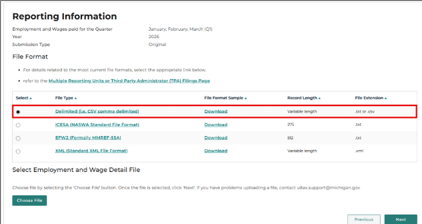
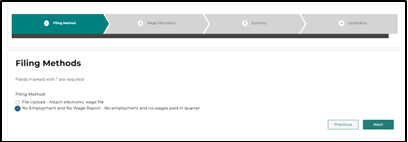
TPAs can select between the File Upload and the No Employment and No Wage Report options to submit bulk reports.
File Upload: TPAs can submit either a MiUI Delimited, ICESA, EFW2, or XML file (see image below)
No Employment and No Wage Report: TPAs can select this option to submit the No Employment and No Wage Report format (see image below)
Once a TPA selects next, they will select the only available radio button and upload their file
Where to find ongoing support and learning resources
Thank you for your continued support as we transition to the new MiUI system. We look forward to collaborating with you beyond the launch to make this transition a success.
Employers and TPAs can can find more information and resources about UIA’s new computer system implementation at
MiUI University.
You can find a link on
UIA’s website to initiate your MiUI account. Be sure to bookmark the link applicable to you:
If you need assistance:
We're here to help every step of the way!
Michigan Unemployment Insurance Agency




.png?rev=f8667e36bb7649b78b91a4db3ceb70b4&mw=1440&hash=21CACD164C8BA89E9ACCEF75761E2B86&extension=webp)
