The Michigan Unemployment Insurance Agency (UIA) is transitioning to a new tax and benefits system called MiUI, which will replace the current Michigan Web Account Manager (MiWAM). MiUI is being launched in two parts, with Tax functions now live, and Benefits functions scheduled to be available this summer.
In this issue of the MiUI Minute, we’re providing a reminder about how to initiate your MiUI account. Find all past editions of the MiUI Minute at MiUI University.
Reminder: Initiate your MiUI Account
MiUI for Tax launched on Monday, February 23. Employers and Third-Party Administrators (TPAs) can now perform tax functions such as filing quarterly wage reports, uploading wage files, registering as a new business, and more in MiUI.
Use MiLogin for Business to Access MiUI
You must create or use your existing MiLogin for Business account to access MiUI. MiUI does not require a separate set of credentials for login; when sign into your MiLogin for Business account you will be able to access MiUI.
Your MiWAM User ID cannot be used to access MiLogin for Business. Be sure to log in via the UIA website so MiUI will automatically be added as a service to your MiLogin for Business account.
If you are a TPA and an employer, you must have a separate MiUI account for each role as the functionality for employers and TPAs is different. You will need an employer User ID and password for MiLogin for Business to manage your business unemployment responsibilities, and a separate TPA User ID and password for MiLogin for Business to associate your TPA account with the employers you serve to be able to complete any actions on their behalf.
Employers Must Initiate Their MiUI Account
MiUI is an employer-driven system, so all employers must initiate their MiUI accounts. Even if a TPA has initiated their account on behalf of an employer and permissions may have been carried over from the MiWAM system, employers still need to initiate their account.
Once employers have initiated their account, they must confirm they have current TPA-Employer associations and proper role assignments. Employers must review and confirm the accuracy of their account details, including their address, contact information, payment plan (if applicable), and reporting units (aka locations).
Employers and TPAs must log into MiWAM to access the 8-digit MiUI Activation Code. Users with a MiWAM Master role will see the MiUI Activation Code tab on the MiWAM landing page (pictured below).
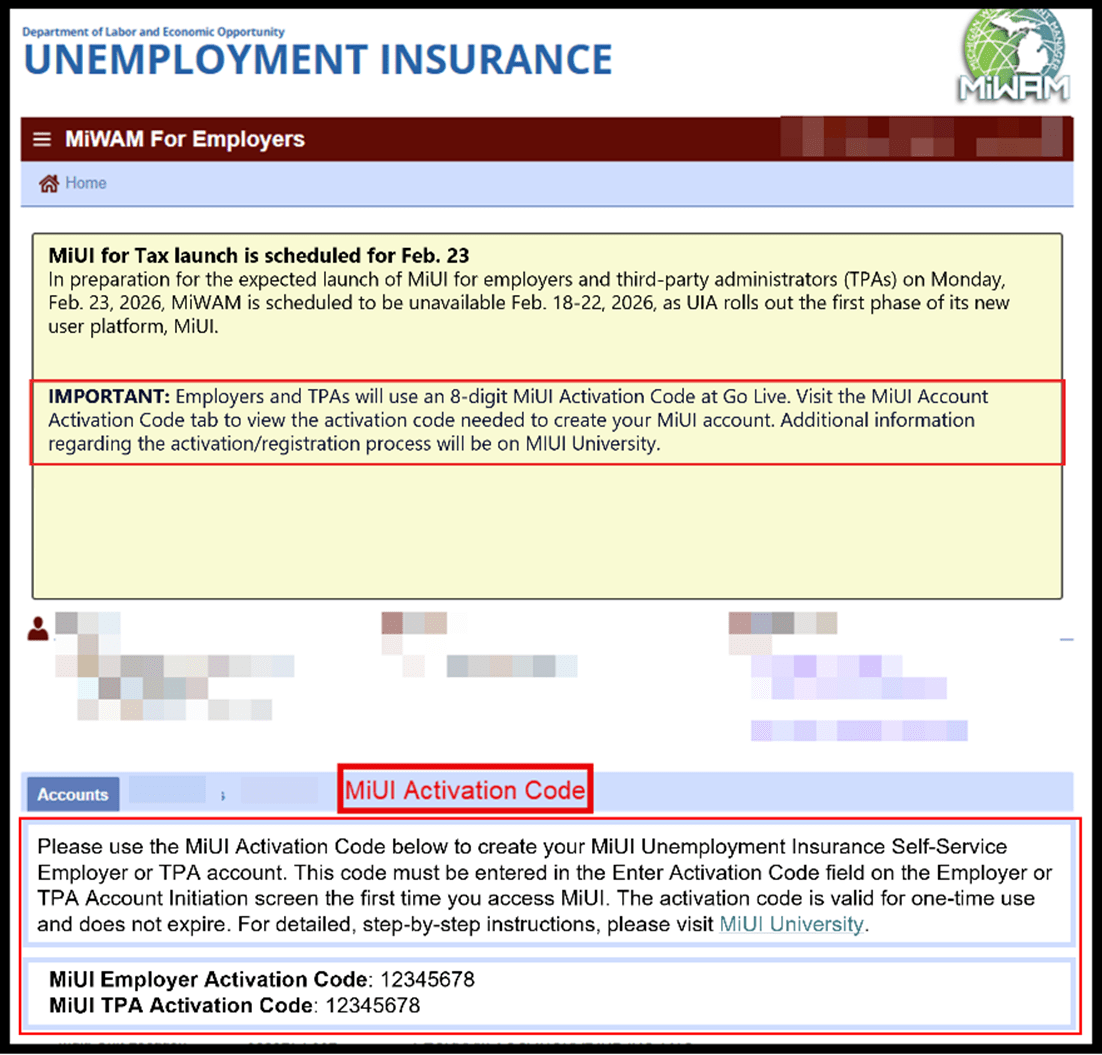
If you do not see your MiUI Activation Code tab, you may not have access. You can provide your employer account number, username, and title to MiWAMSupport@Michigan.gov to get access to your MiUI Activation Code tab.
Note: If the MiLogin account owner is no longer with the company, there is a form the company must fill out to request UIA update the account owner. Reach out to the Office of Employer Ombudsman (OEO) for more details at 1-855-484-2636, Option 4.
Leverage Resources on MiUI University
Remember that you have access to a library of tools and reference guides at MiUI University! If you’re not sure where to start, check out Getting Started with MiUI for Employers and Third-Party Administrators. Download or bookmark the MiUI Toolkit, a comprehensive reference tool for using MiUI for Tax functions.
You must submit past due and current Quarterly Wage Reports in MiUI. First Quarter 2026 is due April 27. It is recommended you
test the wage report file formats before submitting your wage report in MiUI.
If you need help using the Wage Report Validator Tool, refer to Wage Report File Validation Tool Quick Reference Guide for more information. You can also find more information about each of the four file formats accepted in MiUI on the Quarterly Wage Reporting webpage under File Format Specifications.
Where to find ongoing support and learning resources
Thank you for your continued support as we transition to the new MiUI system. We look forward to collaborating with you beyond the launch to make this transition a success.
Employers and TPAs can can find more information and resources about UIA’s new computer system implementation at
MiUI University.
You can find a link on
UIA’s website to initiate your MiUI account. Be sure to bookmark the link applicable to you:
If you need assistance:
We're here to help every step of the way!
Michigan Unemployment Insurance Agency