The Michigan Unemployment Insurance Agency (UIA) is transitioning to a new unemployment tax and benefits system called MiUI, which will replace the current Michigan Web Account Manager (MiWAM). MiUI is being launched in two parts, with Tax functions now live, and Benefits functions scheduled to be available November 9.
In this issue of the MiUI Minute, we’re providing information about viewing benefit charges in MiUI. Find past editions of the MiUI Minute at MiUI University.
Viewing Benefit Charges in MiUI
In MiUI, employers—or third-party administrators (TPAs) with the View Benefit Charges or Edit Benefit Charges role*—will be able to locate charges relating to a claimant.
Employers must have their own MiUI account to be able to perform or assign benefits functions. Time is running out before MiUI for Benefits is rolled out on November 9! Initiate your account TODAY so you will be able to perform important these and other important benefits functions.
Here’s how to view benefit charges
Select the Benefit Charge Activities drop-down from the Employer homepage, and then select Benefit Charge Search (see screenshot).
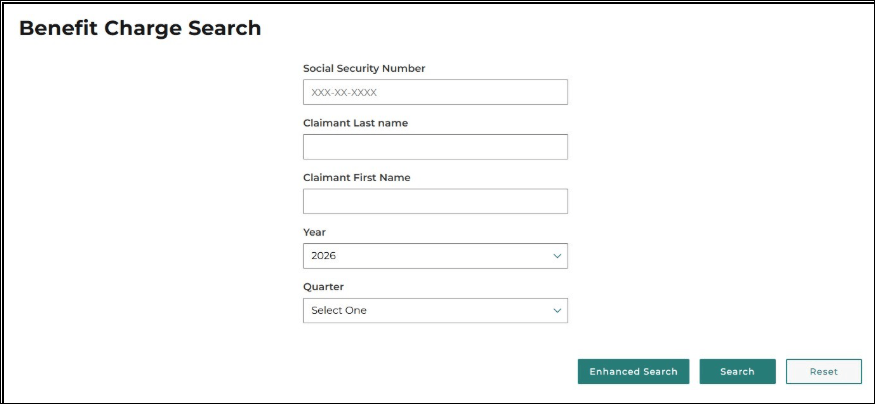
On the Benefit Charge Search screen, search by Social Security number, name, year, and quarter (see screenshot).
You can also view benefit charges by selecting Rate Year Summary under the Benefit Charge Activities drop-down to navigate to the Benefit Charge Rate Year Summary screen.
*To learn how to assign the Edit Benefit Charges or View Benefit Charges role to a TPA, check out this quick reference guide and job aid:
Where to find more information
Thank you for your continued support as we transition to the new MiUI system. We look forward to collaborating with you beyond the launch to make this transition a success.
Employers and third-party administrators (TPAs) can find more information and resources about UIA’s new computer system implementation at MiUI University.
You can find a link on
UIA’s website to initiate your MiUI account. Be sure to bookmark the link applicable to you or click the button below:
If you need help:
We're here to help every step of the way!
Michigan Unemployment Insurance Agency