
The MiSTAR Injection Well Operating Report is for the digital submission of GRMD’s Injection Well Operating Report (EQP 7609). It allows for either monthly or yearly submission of multiple wells on a single report. Operators must use separate templates for wells required to report monthly versus wells required to report annually.
Data validation and field descriptions
When a form file is uploaded, or the SAVE button is clicked, the application performs validation against both the header information and all corresponding detail records. If any auto populated fields seem incorrect after you have uploaded the document to the MiSTAR application, please contact GRMD at EGLE-GRMD-UIC@Michigan.gov. Below users can find descriptions, hints and validation for the Injection Data Form:
Injection Well Operating Report
| Fields | Req. | Validation Criteria and Description |
|---|---|---|
| Operator Name | Yes | Official operator/permittee name with GRMD. |
| Operator Number | Yes | GRMD Operator/Permittee Number. Must match operator uploading document. |
| Report Type | Yes | Must be ‘Monthly’ or ‘Annual’. |
| Report Period (MM/YYYY or YYYY) |
Yes | MM/YYYY for monthly reports and YYYY for annual reports. |
| Revised Records? | Yes | ‘Yes’ or ‘No’: Indicates if report is a revised version of data previously submitted. If revised records are accepted they will overwrite previously submitted records. |
Data Table
| Fields | Req. | Validation Criteria and Description |
|---|---|---|
| API Number Yes | Yes |
Must be 14-digit number, must belong to company listed in header, and must be listed as a Class II well in the GRMD database. If this field shows an error indicating it is not Class II and you believe it should be please contact GRMD. |
| Well Name & Number | Auto |
Auto-populated based on API. |
| UIC Well Type | Auto |
Auto-populated based on API. |
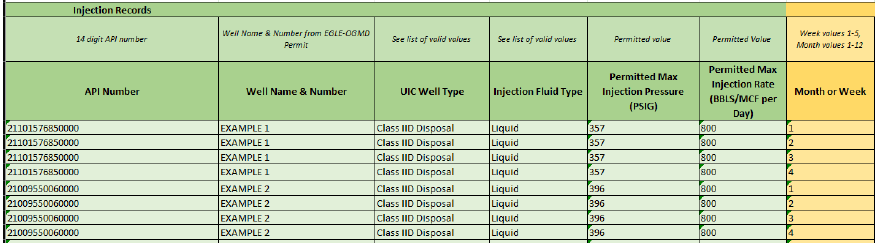
| Injection Fluid Type | Yes | Choose from: ‘CO2’, ‘Gas’, ‘Liquid’ |
| Permitted Max Injection Pressure (PSIG) | Auto | Auto-populated based on API. |
| Permitted Max Injection Rate (BBLS/MCF per Day) | Auto | Auto-populated based on API. |
| Month or Week | Yes | For monthly report use 1-5. For annual report use 1-12. |
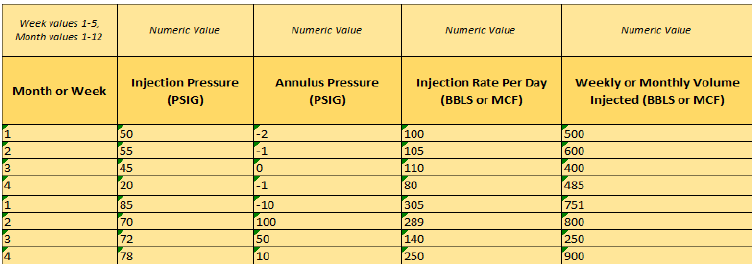
| Injection Pressure (PSIG) | Yes | For each week or month. Use whole numbers. |
| Annulus Pressure (PSIG) | Yes | For each week or month. Use whole numbers. |
| Injection Rate Per Day (BBLS or MCF) | Yes | For each week or month. Allows decimals. Use BBLS or MCF as applicable. |
| Weekly or Monthly Volume Injected (BBLS or MCF) | Yes | For each week or month. Allows decimals. Use BBLS or MCF as applicable. |
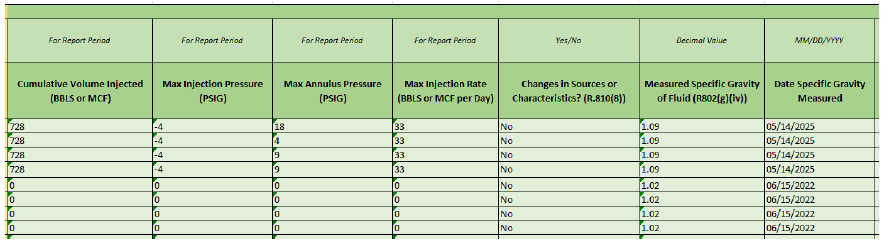
| Cumulative Volume Injected (BBLS or MCF) | Yes | For total report period (either month or year) enter cumulative volume injected in BBLS or MCF. Allows decimals. |
| Max Injection Pressure (PSIG) | Yes | For total report period (either month or year) enter maximum injection pressure in PSIG. Use whole numbers. |
| Max Annulus Pressure (PSIG) | Yes | For total report period (either month or year) enter maximum injection pressure in PSIG. Use whole numbers. |
| Max Injection Rate (BBLS or MCF per Day) | Yes | For total report period (either month or year) enter maximum injection rate in BBLS or MCF per day. Allows decimals. |
| Changes in Sources or Characteristics? | Yes | Have there been any changes in the characteristics or sources of fluids that are being injected? Use ‘Yes’ or ‘No’. |
| Measured Specific Gravity of Fluid | Yes | See R802(g)(iv). Allows decimals. |
| Date Specific Gravity Measured | Yes | MM/DD/YYYY |
| Comment: Note MIP exceed, anomalies or problems | No | Note if MIP or MIR exceed the permitted values or if any other anomalies or problems occurred. |
Understanding data input: time frame and layout
The Injection Well Operating Report form can be used for either monthly or yearly reporting for multiple wells per form. The user must pick either monthly OR yearly report type in the header section of the report. The user’s choice applies to all the wells included in the lower data table portion of the report. Wells with monthly and annual reporting requirements cannot be entered on the same form.
The fields Injection Pressure, Annulus Pressure, Injection Rate Per Day and Weekly or Monthly Volume Injected are required per Rule 324.810 (1-4) of Part 615. Each of these fields should have one data value per week/month being reported.
In the example below (for a month with 4 weeks), information is entered for two wells as indicated by API number in the leftmost column. Repeated fields include API Number, Well Name & Number (auto-populated), UIC Well Type (auto-populated), Injection Fluid Type, Permitted MIP (auto-populated), and Permitted MIR (auto-populated) and calculated fields such as cumulative or max. These are repeated across four rows of the table, with one row for each week in the month. A report using the annual time frame would have 12 rows per well and the numbers 1-12 in the Month or Week column.