The Michigan Unemployment Insurance Agency (UIA) is transitioning to a new unemployment tax and benefits system called MiUI, which will replace the current Michigan Web Account Manager (MiWAM). MiUI is being launched in two parts, with Tax functions now live, and Benefits functions scheduled to be available beginning November 9.
In this issue of the MiUI Minute, we’re sharing a quick update on Employer Filed Claims (EFC) in MiUI. Find past editions of the MiUI Minute at MiUI University.
Employer Filed Claims in MiUI
By participating in the Employer Filed Claims program, employers can submit unemployment claims information online on behalf of full-time workers who are temporarily or permanently laid off. This fast, secure way of transferring claims information allows an employer to better manage the accuracy of the information provided to UIA. Using EFC also means the employer will have a record of all approved layoffs to match against incoming unemployment charges to their account.
When MiUI’s benefits functions launch November 9, employers will be able to file unemployment claims directly in MiUI once their request has been approved by UIA, and the required Memorandum of Understanding (MOU) is received and signed through their MiUI Employer Inbox. Rather than submitting claims through email, which is the current process in MiWAM, employers will follow a streamlined approval process in the system that grants access to claim filing functionality. This process provides a more secure, efficient, and trackable way to submit claims.
How to Request and File an EFC
- The employer requests an EFC in MiUI.
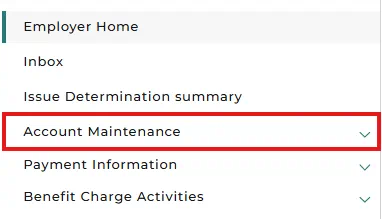
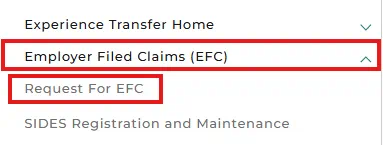
- From the Employer Home screen, under the Account Maintenance drop-down in the left navigation menu, select the Employer Filed Claims (EFC) drop-down, then select Request for EFC.
- The employer answers the questions on the request form and submits it.
- The EFC request is reviewed by UIA.
- If the request is rejected, the employer has the option to submit a new request right away. If approved, the employer receives a Memorandum of Understanding (MOU) in their MiUI Employer Inbox.
- The employer electronically signs the MOU and submits it.
- UIA confirms the signed MOU and submits the final approval.
- Once the employer is notified of the final approval in their MiUI Employer Inbox, they can submit an EFC file.
- From the Employer Home screen, under the Account Maintenance drop-down in the left navigation menu, select the Employer Filed Claims (EFC) drop-down, then select Submit EFC.
- On the Reporting Information page, select Choose File then select Next.
- Finally, review the information on the File Preview screen before selecting Next.
- A confirmation message will confirm successful submission of the EFC file.
Learn More with EFC Resources
For step-by-step guidance and additional details, please see the following EFC resources on MiUI University:
Where to find more information
Thank you for your continued support as UIA transitions to a modern, user-friendly MiUI. We look forward to collaborating with you beyond the launch to make this change is a success.
Employers and third-party administrators (TPAs) can find more information and resources about UIA’s new computer system implementation at MiUI University.
You can find a link on
UIA’s website to initiate your MiUI account. Be sure to bookmark the link applicable to you or click the button below:
If you need help:
We're here to help every step of the way!
Michigan Unemployment Insurance Agency