The Michigan Unemployment Insurance Agency (UIA) is transitioning to a new tax and benefits system called MiUI, which will replace the current Michigan Web Account Manager (MiWAM). MiUI is being launched in two parts, with Tax functions now live, and Benefits functions scheduled to be available later in 2026.
In this issue of the MiUI Minute, we’re sharing a required action for employers to initiate their MiUI account. Find past editions of the MiUI Minute at MiUI University.
Action Required: Initiate your MiUI Employer Account
It is very important that employers initiate their own MiUI unemployment account. Even if you have a third-party administrator (TPA) you must maintain your own employer account. This will be key because second-quarter wage reports are due this month. You also will need your own MiUI account to see benefit claim information or file protests and appeals when phase 2 of MiUI launches later this year. Don’t wait! Initiate your MiUI employer account TODAY!
You will have full access to MiUI’s tax functions — such as filing quarterly wage reports and uploading wage files — and be ready for benefits functions when they roll out!
Here is what you need to do:
- Find Your MiUI Activation Code
- Users must log into MiWAM to access the 8-digit MiUI Activation Code. If your business operates as a liable employer and acts or reports on behalf of other companies as a TPA, you must manage both those accounts separately, with two Activation Codes.
- Users with a MiWAM Master role will see the MiUI Activation Code tab on the MiWAM landing page (pictured below).
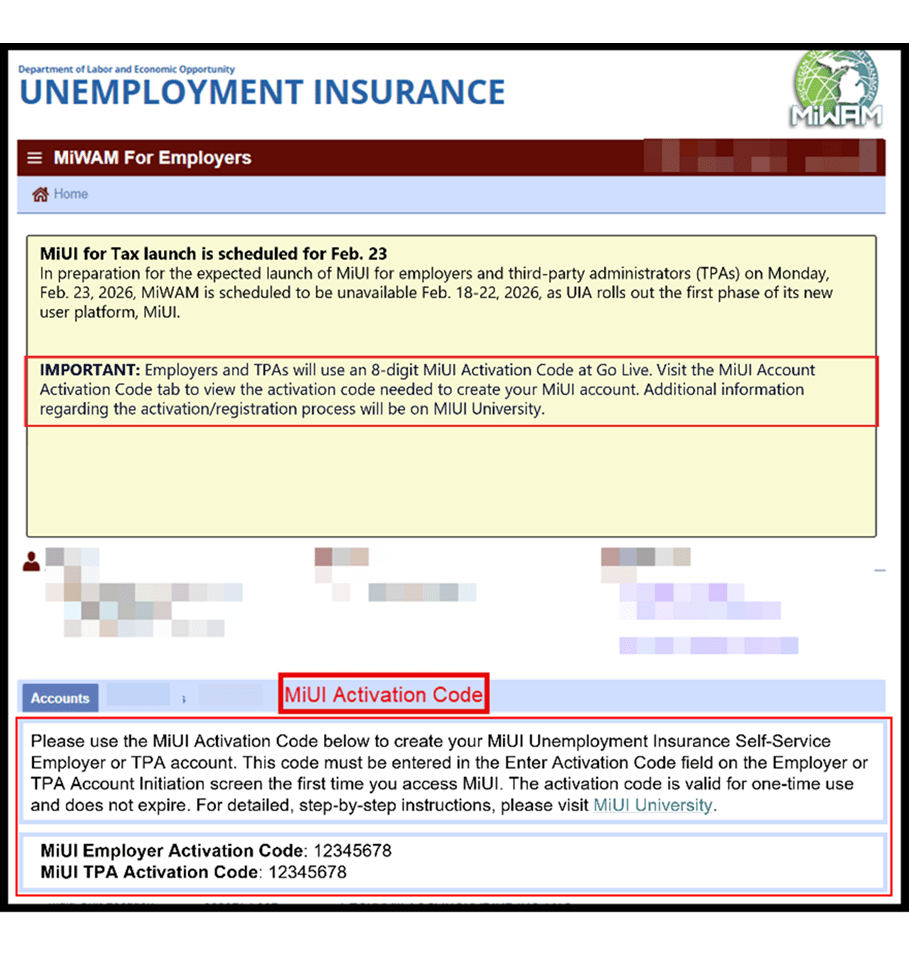
- If you do not see your MiUI Activation Code tab, you may not have access. You can provide your employer account number (EAN), username, and title in the Employer - TPA Issue Tracker using the MiWAM issue type to get access to your MiUI Activation Code tab.
- Note: If the MiWAM or MiUI account owner is no longer with the company, there is a process to request a change to the UIA account owner information. Please use the Employer - TPA Issue Tracker to report this issue.
- Use MiLogin for Business to Access MiUI
- You must create a MiLogin for Business account or use your existing MiLogin account to access MiUI. MiUI does not require a separate set of credentials for login; when sign into your MiLogin for Business account you will be able to access MiUI.
- Your MiWAM User ID cannot be used to access MiLogin for Business.
- You can find a link on UIA’s website to initiate your MiUI account. Be sure to bookmark the link applicable to you or click the link below so that MiUI will automatically be added as a service to your MiLogin for Business account:
- If you are a TPA and an employer, you must have a separate MiUI account for each role as the functionality for employers and TPAs is different. You will need an employer User ID and password for MiLogin for Business to manage your business unemployment responsibilities, and a separate TPA User ID and password for MiLogin for Business to associate your TPA account with the employers you serve to be able to complete any actions on their behalf.
- Confirm TPA Associations and Roles
Reminder: Quarter 2 Wage Reports Due July 27
You must submit past due and current Quarterly Wage Reports in MiUI. Quarter 2 reports are due Monday, July 27. It is essential that you submit your reports by the deadline as penalties and interest can accrue if reports are submitted late.
It is recommended you test the wage report file formats before submitting your wage report in MiUI.
If you need help using the Wage Report Validator Tool, refer to this guide for more information. You can also find more information about each of the four file formats accepted in MiUI on the Quarterly Wage Reporting webpage under File Format Specifications.
Have Questions? Leverage Resources on MiUI University
Remember that you have access to a library of tools and reference guides at MiUI University!
If you’re not sure where to start, check out Getting Started with MiUI for Employers and Third-Party Administrators. Download or bookmark the MiUI Toolkit, a comprehensive reference tool for using MiUI for Tax functions.
Where to find support and learning resources
Thank you for your continued support as we transition to the new MiUI user platform. We look forward to continuing to collaborate with you now that tax functions have launched and benefits functions are coming soon.
If you need help:
We're here to help every step of the way!
Michigan Unemployment Insurance Agency