The Michigan Unemployment Insurance Agency (UIA) is transitioning to a new unemployment tax and benefits system called MiUI, which will replace the current Michigan Web Account Manager (MiWAM). MiUI Tax functions are live and Benefits functions are scheduled to be available November 9, 2026.
In this issue of the MiUI Unemployment Update, we’re sharing details about how to file a claim in MiUI.
Filing a Claim in MiUI
Filing an initial unemployment benefits claim or completing a weekly certification for an open claim is the first time many users will interact with MiUI. It is important to know ahead of time what is required to file or certify, what to expect to see in the system, and where to find what is needed.
What information is needed to apply for benefits?
At the beginning of the claim filing process in MiUI, workers seeking benefits will be prompted to review the information required to file, as shown on the Claimant Roadmap.
What to expect during claim filing
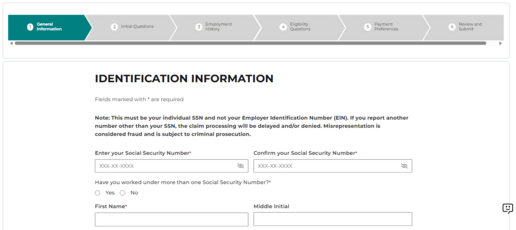
Filing an unemployment benefit claim in MiUI will likely take about 30 minutes (every claim is different and some could take longer). It involves the following six steps:
- General Information.
- Initial Questions.
- Employment History.
- Eligibility Questions.
- Payment Preferences.
- Review and Submit.
The steps must be completed in order. Users can save their progress and come back later, but the claim must be submitted by 11:59 p.m. on Saturday. If not submitted by then, progress on filing the claim will be lost, and the process will need to be started over again.
Where to go in MiUI to file a claim
The first step is to create or log into an existing MiLogin for Citizens account before accessing MiUI.
Learn how to create a MiLogin for Citizens account
MiLogin for Citizens allows users to access many state services and systems online, across multiple departments, using a single User ID and Password. When creating a MiLogin for Citizens account, users must provide a unique email address and/or mobile phone number before they are able to complete account setup. The email or phone number cannot be shared with another user.
Claim Filing in MiUI
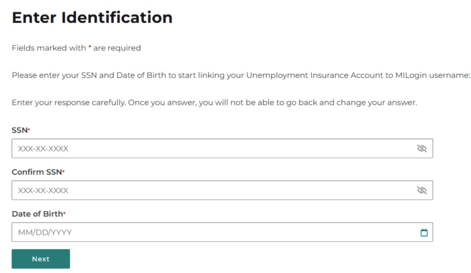
After accessing MiUI, the individual will be prompted to enter their Social Security number and date of birth, as shown in the screen below:
On the next screen, select Apply for Benefits to begin the claim filing process.

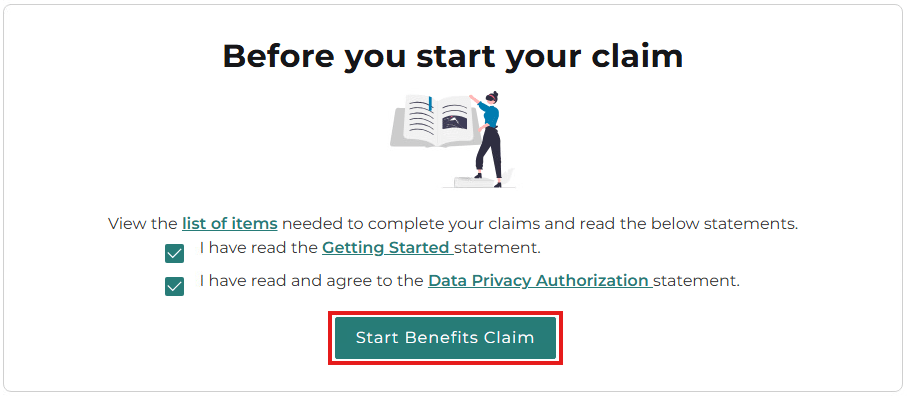
MiUI will also provide a reminder at the beginning of the process with the list of required information to apply for benefits. After viewing the list of items, read and confirm the Getting Started and Data Privacy Authorization statements, then select Start Benefits Claim.
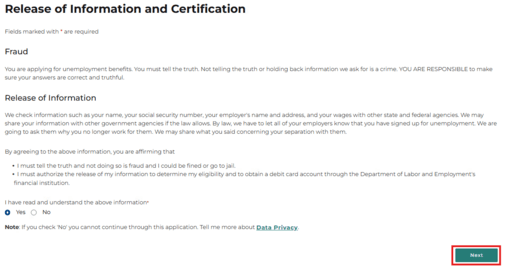
Read the Release of Information and Certification, select the Yes radio button, then select Next.
While completing sections, a progress bar at the top of the screen will indicate which of the six steps is currently in progress:
The application can be saved and exited at any time using the Save and Exit button at the bottom of the screen:

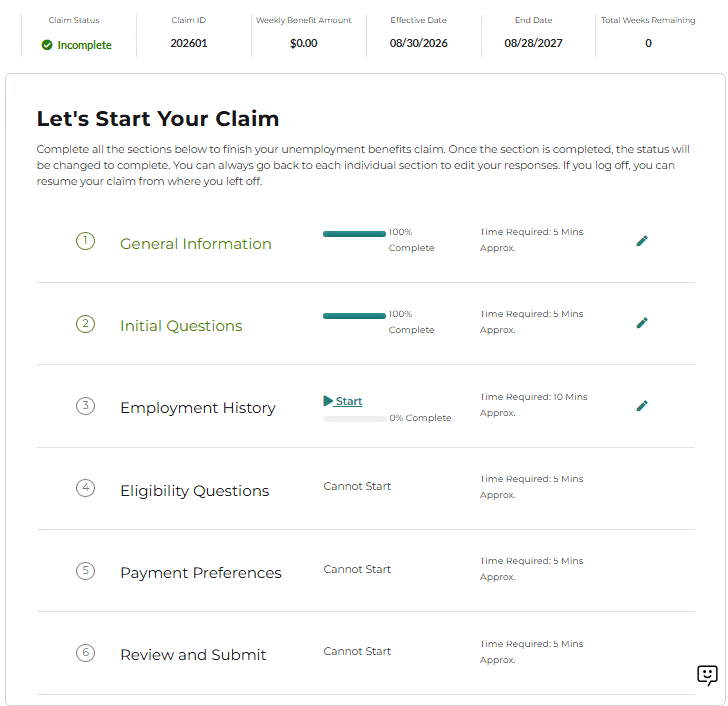
If the application is saved and exited, a claim progress screen will display Completed, In Progress, and Not Started items. The application can be continued from the last step worked on, or a previous step can be edited by selecting the pencil icon, as seen below:
The final step in the process is to review and submit the application, after which the applicant will see their Claimant Homepage.
Stay Informed at MiUI University
To keep you informed and help you stay on track ahead of the launch, be sure to check out the MiUI University for Workers page, which offers information about the transition to MiUI. This page will be updated regularly with support resources to educate you about MiUI, including overviews, guides, and videos.
Visit MiUI University for Workers
Thank you for your continued support as we transition to the new MiUI system. We look forward to collaborating with you beyond the launch to make this transition a success.
We're here to help every step of the way!
Michigan Unemployment Insurance Agency